Why I replaced AI search with guided search
AI search understood intent, but it was slow and hard to control. I replaced it with guided search, then implemented and shipped it myself.
Overview
AI search made discovery harder, not easier.
AI search understood what customers meant, but it moved them away from the catalog, responded slowly, and hid how results were chosen. Keyword search restored speed but still returned too many dead ends.
I replaced both approaches with guided search that kept customers in the catalog, showed what they could search, and kept results and filters working together. Then I implemented and released it myself.
Problem
- AI search moved customers to a separate, slower page.
- Keyword search only matched literal terms and often returned nothing.
- Customers searched by location, age, cash payment, discounts, and what was new, not only activity names.
- Search and filters could conflict without explaining what changed.
The old search
One version was smart but slow. The next was fast but brittle.
Tripsome first introduced AI search so users could describe what they wanted in their own words. It could infer intent, but the separate page and slower response made discovery feel disconnected.
We then moved to a basic query. It was faster and easier to understand, but a district, age group, or activity idea could return nothing even when relevant activities existed.
- AI understood more, but explained less.
Users could not easily see, adjust, or trust how the query became a result.
- Keyword search responded faster, but helped less.
It matched stored words instead of helping users bridge the gap between intent and catalog data.
Research
The query was only part of the problem.
Both versions focused on matching a query but ignored everything around it. I mapped how customers could explore the catalog through activities, locations, age groups, new listings, cash payment, and discounts.
That showed me the real gap. Search, suggestions, results, and filters needed to work together.
- Keep search in the catalog
Customers should not leave the results to start or adjust a search.
- Make search and filters work together
A new search should resolve a conflicting filter instead of returning nothing.
- Show what people can search
Suggestions should expose more than activity names.
Implementation
I designed and shipped the release myself.
AI made it practical for me to implement the complete experience. I moved directly from a product decision to working code, then tested it against real scenarios.
When something failed, I changed the design and implementation together.
Prompt
Describe the intended interaction, product rule, and smallest useful version.
Break
Test the vibe-coded build with real queries, conflicts, languages, and mobile states.
Review & refine
Use a second model to review the diff, then turn failures into clearer rules and code changes.
Ship
Run the final checks, merge the PR, and release.
Solution
Search should not just return results. It should show customers what they can find.
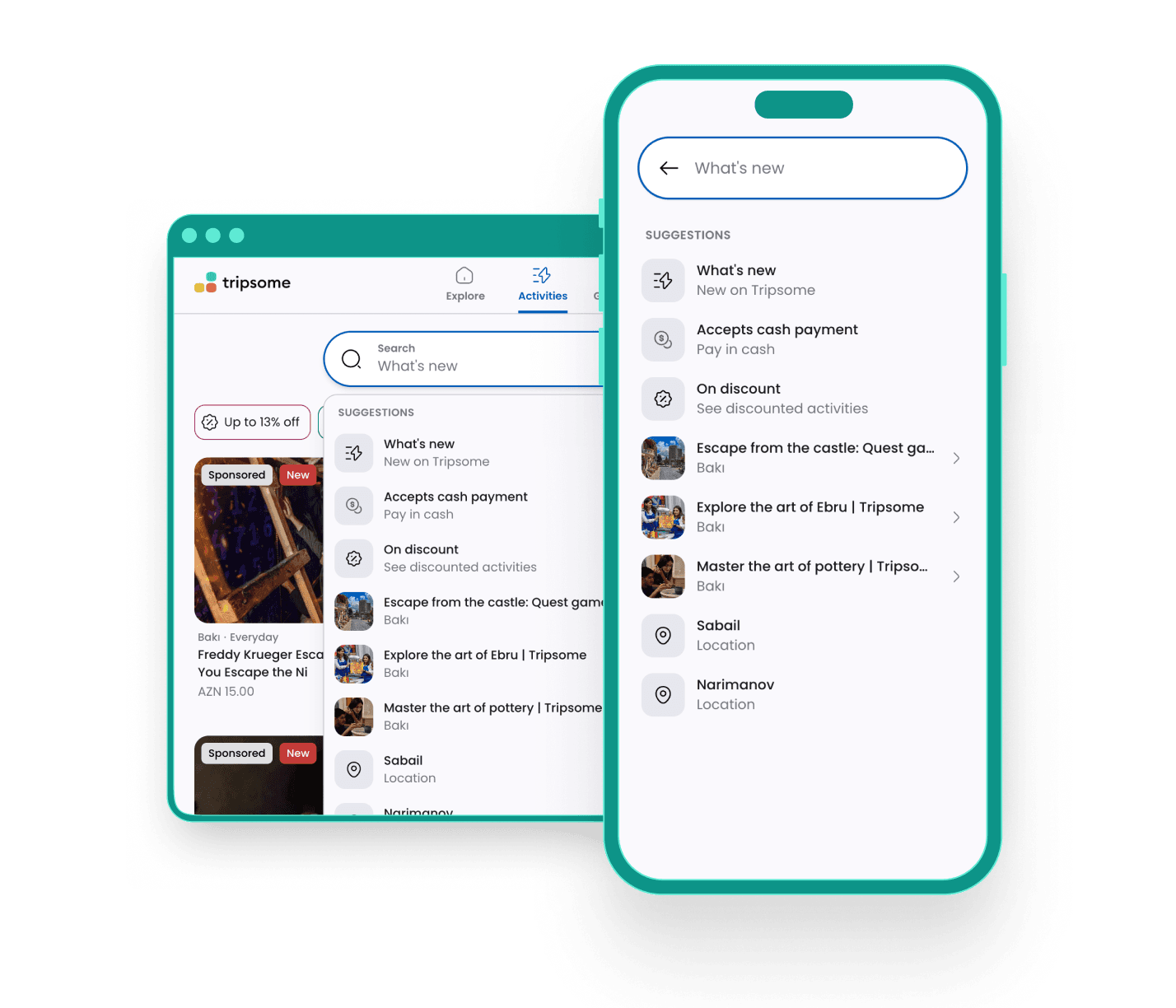
Search stayed on the catalog page. Each query updated the suggestions, results, and available filters together.
When a search conflicted with an existing filter, search took priority and the interface explained what changed.
What I shipped
Five behaviors worked together.
- Suggestions across the catalog
Activities, locations, ages, new listings, cash payment, and discounts became searchable.
- Search-aware filters
Filter options recalculated from the activities currently in the result set.
- Visible conflict resolution
A new search cleared incompatible filters and explained why.
- Recovery from empty results
No-result states explained the query and offered another way forward.
- Mobile and multilingual behavior
The interaction worked across devices and Azerbaijani, English, and Russian.
Suggestions became a discovery layer
Suggestions did more than show individual activities. They exposed different ways to explore the catalog, including what was new, on discount, available for cash payment, suitable for children, or nearby.
Customers no longer needed to know an exact activity name or open the filter menu first. Search showed what they could look for before they typed.
Filters adapted to each search
When search narrowed the results, the filter menu only showed locations that were still available.
A short message explained why the list changed and let customers clear the search.
No results still offer a next step
The empty state repeats the query, explains what can be searched, and offers nearby alternatives instead of leaving the customer at a dead end.
Mobile search needed its own interaction model
On mobile, search opened as a focused screen that stayed usable with the keyboard open.
New searches resolve conflicting filters
If a customer searched Icherisheher after filtering Sabail, search cleared the conflicting filter.
A snackbar explained why instead of returning an empty page.
Search understood queries across languages
Customers did not need to change the app language before searching. Someone browsing in Azerbaijani could type “new” in English and still find new activities.
Search recognized common terms across Azerbaijani, English, and Russian while keeping suggestions, results, and filters in the customer's current interface language.
Results
Revenue growth was 23 points stronger than the same period in 2025
Revenue grew 40% from June to July 2026. Over the same months in 2025, it grew 17%, making the 2026 increase 23 percentage points stronger.
Search launched in late July, so this is an early impact signal. More season-to-season data from comparable periods is needed to validate the release's longer-term effect.
Reflection
Directing AI kept design and implementation in one loop.
I gave AI clear interaction rules, used it to build working versions, then tried to break them with real scenarios.
That kept product design, implementation, and QA in one loop and let me refine the experience through release.